
Mocking & Breakpoints
Glance's rule engine allows you to intercept and modify traffic on the fly using mocks and breakpoints.
Overview
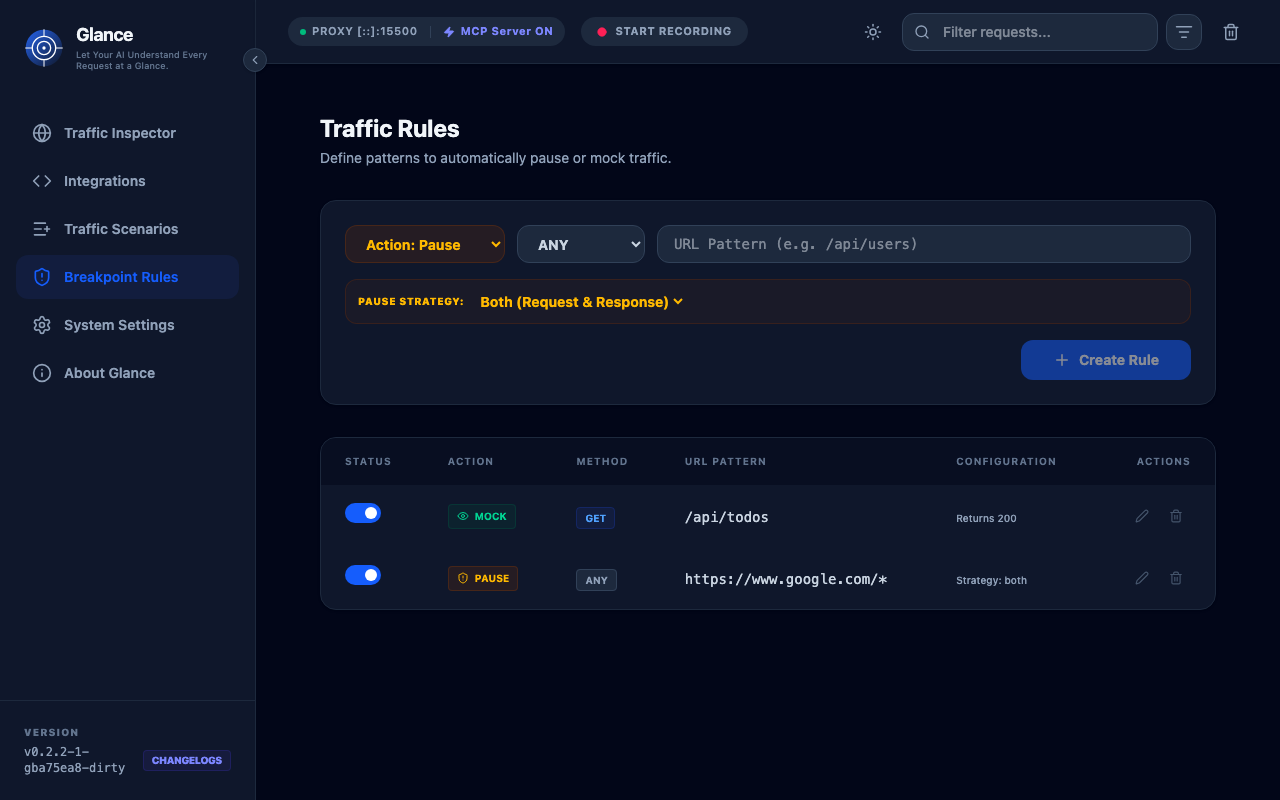
The rule engine supports two types of rules:
- Mocks: Return static responses without hitting the real server
- Breakpoints: Pause traffic for manual inspection and modification
Both types use pattern matching to determine which requests to intercept.
Mocks
Mocks allow you to return custom responses for specific requests without contacting the actual server.
Creating a Mock
- Go to the Rules tab in the dashboard
- Click Add Mock
- Configure the mock:
- Name: Descriptive name for the rule
- URL Pattern: Glob or regex pattern to match
- Method: HTTP method (or
*for all) - Status Code: HTTP status to return
- Headers: Response headers (key-value pairs)
- Body: Response body content
Example: Mock User API
{
  "name": "Mock Users API",
  "urlPattern": "https://api.example.com/users*",
  "method": "GET",
  "statusCode": 200,
  "headers": {
    "Content-Type": "application/json"
  },
  "body": {
    "users": [
      {"id": 1, "name": "Alice"},
      {"id": 2, "name": "Bob"}
    ]
  }
}
Pattern Matching
Glance supports flexible pattern matching:
- Exact Match:
https://api.example.com/users - Wildcard:
https://api.example.com/users/* - Any Subdomain:
https://*.example.com/users - Query Parameters:
https://api.example.com/users?page=*
Response Types
Mocks support various response formats:
- JSON: Automatically serialized
- XML: Served with appropriate content type
- HTML: For mocking web pages
- Plain Text: Simple text responses
- Binary: Base64-encoded data
CORS Handling
Mocks automatically handle CORS:
- Responds to
OPTIONSpreflight requests - Includes permissive CORS headers
- Supports credentials and custom headers
Breakpoints
Breakpoints pause requests or responses for manual inspection and modification.
Creating a Breakpoint
- Go to the Rules tab
- Click Add Breakpoint
- Configure:
- Name: Descriptive name
- URL Pattern: Pattern to match
- Method: HTTP method
- Type: Request, Response, or Both
Using Breakpoints
When a breakpoint is triggered:
- Traffic is paused
- Notification appears in dashboard
- You can inspect and modify:
- Headers
- Body
- Status code (for responses)
- Click Continue to release the traffic
- Or Drop to block the request
Example Use Cases
Debug Authentication:
- Set breakpoint on login endpoint
- Inspect credentials being sent
- Modify token in response
Test Error Handling:
- Pause successful response
- Change status to 500
- Verify app handles error correctly
Modify API Response:
- Intercept user profile endpoint
- Add/remove fields in JSON
- Test frontend with different data structures
Rule Management
Priority
Rules are evaluated in order:
- Breakpoints are checked first
- Then mocks
- First matching rule wins
You can reorder rules by dragging them in the dashboard.
Enable/Disable
Toggle rules on/off without deleting them:
- Green Toggle: Rule is active
- Gray Toggle: Rule is disabled
Rule Statistics
Each rule shows:
- Number of matches
- Last matched timestamp
- Success/failure count
Advanced Features
Conditional Mocks
Use headers to conditionally apply mocks:
{
  "urlPattern": "https://api.example.com/*",
  "requiredHeaders": {
    "X-Mock-Scenario": "error"
  },
  "statusCode": 500
}
Dynamic Responses
Include variables in mock responses:
: Current Unix timestamp: Random UUID: Random number
Template Bodies
Use JSON templates for complex responses:
{
  "id": "{{uuid}}",
  "created_at": "{{timestamp}}",
  "status": "success"
}
MCP Integration
AI agents can create and manage rules via MCP:
Create a mock for the login endpoint that returns a success tokenClaude will use the add_mock_rule tool to create the mock for you.
Best Practices
Naming
Use descriptive names:
- ✅ "Mock successful login with admin token"
- ❌ "test1"
Patterns
Be specific to avoid unintended matches:
- ✅
https://api.example.com/v1/users/* - ❌
*users*(too broad)
Organization
Group related rules:
- Use prefixes: "Auth - Login Mock", "Auth - Token Refresh"
- Create scenarios for different test cases
- Disable rules when not in use
Testing
Always test your rules:
- Create the rule
- Trigger it with a request
- Verify in traffic list that rule matched
- Check response is as expected
Troubleshooting
Mock Not Matching
- Check URL pattern matches exactly
- Verify method is correct
- Ensure rule is enabled
- Check rule priority
Breakpoint Not Triggering
- Verify pattern syntax
- Check request method
- Ensure breakpoint type is correct
CORS Issues
Mocks include CORS headers by default. If still having issues:
- Check browser console for specific CORS error
- Add custom CORS headers to mock
- Verify
Access-Control-Allow-Originis set
Next Steps
- Scenario Recording - Group requests into replayable sequences
- MCP Integration - Let AI create rules for you
- API Reference - Use the REST API to manage rules