
Traffic Inspection
Glance provides powerful tools for inspecting HTTP/HTTPS traffic in real-time.
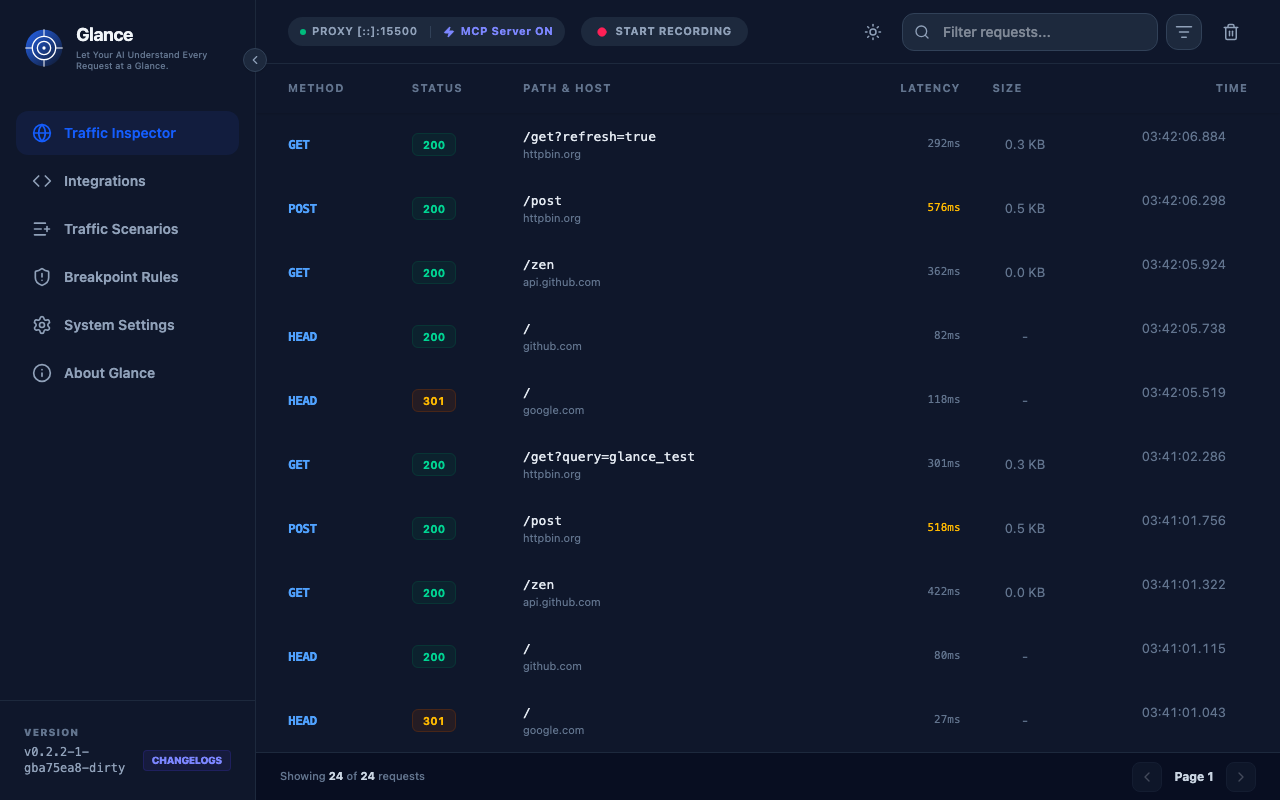
Real-time Live View
The dashboard updates automatically as requests flow through the proxy:
- WebSocket Streaming: New requests appear instantly without page refresh
- Automatic Updates: No manual polling required
- Smooth Animations: Visual feedback for new traffic
Traffic List
The main traffic view shows:
| Column | Description |
|---|---|
| Method | HTTP method (GET, POST, PUT, DELETE, etc.) |
| URL | Full request URL with protocol |
| Status | HTTP status code (200, 404, 500, etc.) |
| Size | Response body size in human-readable format |
| Time | Request timestamp |
| Duration | Request round-trip time |
Filtering Traffic
Use the search and filter controls to find specific requests:
- Search: Filter by URL, method, or status
- Method Filter: Show only specific HTTP methods
- Status Filter: Filter by status code ranges (2xx, 4xx, 5xx)
- Time Range: View traffic from specific time periods
Request Details
Click any request to view detailed information:
Request Tab
- URL: Full request URL with query parameters
- Method: HTTP method
- Headers: All request headers in key-value format
- Query Parameters: Parsed query string parameters
- Body: Formatted request body (JSON, XML, or raw)
Response Tab
- Status: HTTP status code and message
- Headers: All response headers
- Body: Formatted response body with syntax highlighting
- Size: Response size and compression info
- Timing: Detailed timing breakdown
Body Formatting
Glance automatically formats common content types:
- JSON: Syntax-highlighted, collapsible tree view
- XML: Formatted and syntax-highlighted
- HTML: Rendered preview and source view
- Images: Inline preview
- Plain Text: Raw display
HTTPS Decryption
Glance intercepts HTTPS traffic using MITM techniques:
How It Works
- CA Certificate: Glance generates a local Certificate Authority
- Dynamic Certificates: Creates certificates on-the-fly for each domain
- Transparent Proxy: Applications see valid certificates
- Full Visibility: Decrypts traffic for inspection, then re-encrypts
Security Considerations
⚠️ Important: HTTPS decryption requires trusting Glance's CA certificate. Only do this on your own machine with traffic you control.
- CA certificate is generated locally
- Never share your CA private key
- Only use Glance in development/testing environments
- Trust the certificate only on devices you control
Export as cURL
Every request can be exported as a curl command:
bash
curl 'https://api.example.com/users' \
  -H 'Authorization: Bearer token123' \
  -H 'Content-Type: application/json' \
  --compressed
Features:
- Includes all headers
- Preserves request body
- Handles authentication
- Copy with one click
Advanced Features
Search & Filter
- Keyword Search: Search across URL, headers, and body
- Regex Support: Use regular expressions for advanced filtering
- Multiple Filters: Combine filters for precise results
Traffic Management
- Clear Traffic: Remove all captured requests
- Auto-Clear: Automatically clear old traffic after N requests
- Export: Save traffic for later analysis
Real-time Statistics
Dashboard shows:
- Total requests captured
- Average response time
- Success/error rate
- Top domains
- Most common endpoints
Next Steps
- Mocking & Breakpoints - Modify traffic on the fly
- Scenario Recording - Record request sequences
- MCP Integration - Let AI analyze your traffic